
Activation Lock Ruined My iPhone Deal – Here’s What Happened & How to Avoid It
📱 The Story We’ve All Lived Through
Picture this.
You’ve been searching for weeks. Scrolling through Facebook Marketplace, Craigslist, eBay, and local classifieds. Finally – you find it.
A gorgeous iPhone. Latest model. Perfect condition. And the price? An absolute steal. Hundreds of dollars below market value.
Your heart races. You message the seller immediately. “Is this still available?”
They reply within seconds. “Yes, still available. Cash only. First come, first served.”
You grab your wallet, jump in the car, and drive across town. You’re excited. You can already imagine setting up your new phone, transferring your data, taking stunning photos.
You meet the seller. The phone looks flawless. No scratches. No cracks. The screen lights up beautifully.
You hand over the cash. $500, $600, maybe $700 – a fraction of what it’s worth.
You get back to your car. You can’t wait to set it up.
You turn it on.
And then…
⚠️ The Moment Everything Falls Apart
The screen lights up. The iconic Apple logo appears. You smile.
Then comes the “Hello” screen. You swipe up.
And then you see it:
“Activation Lock”
“This iPhone is linked to an Apple ID. Enter the Apple ID and password used to set up this device.”
Your stomach drops.
You try typing in your own Apple ID. It doesn’t work. You try again. Nothing.
You message the seller. No reply.
You call. Straight to voicemail.
You message again. “Read” – but no response.
And then you realize…
You’ve just been scammed.
💔 The Cold, Hard Reality
You didn’t buy an iPhone. You bought an expensive paperweight.
| What You Thought You Bought | What You Actually Got |
|---|---|
| Fully functional iPhone | A locked brick |
| Great deal | Total loss of money |
| New phone to enjoy | Months of frustration |
| Working device | A useless piece of metal and glass |
Activation Lock ruined your iPhone deal.
And it happens to thousands of people every single day.
🔍 What Is Activation Lock and Why Does It Ruin Deals?
Activation Lock is Apple’s anti-theft feature. It was introduced in iOS 7 with “Find My iPhone.” It’s designed to do one thing:
Make stolen iPhones completely useless.
When Activation Lock is enabled:
-
The device is permanently linked to the owner’s Apple ID
-
Even after a factory reset, the lock remains
-
Without the original Apple ID and password, you CANNOT use the device
-
It’s impossible to bypass without the owner’s cooperation (or Apple’s help)
This is a GREAT feature for theft prevention.
But it’s a NIGHTMARE for buyers of used phones.
📊 The Scale of the Problem
| Statistic | Number |
|---|---|
| iPhones reported stolen annually | Over 300,000 |
| Used iPhones sold with Activation Lock | Estimated 10–15% |
| Average loss per buyer | $400–$800 |
| Total losses annually | Hundreds of millions |
| iPhone deals ruined daily | Thousands |
🧠 Why Scammers Love Activation Lock
Scammers know exactly what they’re doing. Here’s their playbook:
Step 1 – Find a Locked iPhone
They buy cheap, locked devices (sometimes stolen) for $50–$100.
Step 2 – List It as a “Steal Deal”
They list it on Marketplace, Craigslist, or OfferUp at a price that’s too good to resist.
Step 3 – Meet in Person
They show you the phone. It turns on. It looks perfect. They’re friendly and convincing.
Step 4 – Take Your Cash
You pay them. They disappear.
Step 5 – You Discover the Lock
You turn on the phone and realize you’ve been scammed.
Step 6 – You Can’t Do Anything
The seller is gone. The number is disconnected. The account is deleted.
And now YOU own a locked, useless device.
💰 The True Cost of a “Good Deal”
Let’s break down what your “steal deal” actually costs you:
| Expense | Amount |
|---|---|
| Purchase price | $500 |
| Time wasted driving | $20 (gas + time) |
| Time spent negotiating/messaging | $15 |
| Frustration and stress | Priceless |
| Attempts to unlock (fake tools) | $50–$100 (if you’re not careful) |
| Potential sale as parts | -$50 (if you’re lucky) |
| Total LOSS | $500–$700+ |
That “great deal” just became your most expensive mistake.
😡 Real Stories from Real People
Sarah – Lost $600 on an iPhone 13 Pro
“I bought it from a guy on Facebook Marketplace. He said it was his personal phone, upgraded to the new model. I checked everything – IMEI looked clean, the phone turned on. I paid $600 cash. When I got home and tried to set it up, Activation Lock popped up. I messaged him – blocked. He deleted his profile. I felt so stupid.”
Mark – Bought a “New in Box” iPhone 12
“The seal looked perfect. It was in the original box with all the accessories. I didn’t open it in front of him because it was sealed. I paid $700. When I opened it at home, the phone was locked. He had re-shrink-wrapped it. I lost everything.”
Jessica – Scammed at a Starbucks
“We met at a Starbucks. He seemed so nice. Showed me the phone, said he needed cash for rent. I checked it quickly – it turned on. I paid $500. After he left, I realized the Wi-Fi was off and the phone was tethered to a fake network. Activation Lock showed up immediately. I was crushed.”
🛡️ How to NEVER Let Activation Lock Ruin Your iPhone Deal
Follow these 10 rules before buying any used iPhone:
✅ Rule 1 – Check Before Paying
NEVER pay before checking Activation Lock status.
Here’s what to do:
-
Turn on the phone
-
Swipe up from the “Hello” screen
-
If it asks for an Apple ID and password – WALK AWAY
-
If it goes to the home screen – ask the seller to reset it in front of you
✅ Rule 2 – Ask for IMEI/Serial Number BEFORE Meeting
Get the IMEI or serial number and check it online for free:
-
Apple’s Activation Lock status: https://checkcoverage.apple.com
-
IMEI checkers: Several free services online
-
Check if the device is: (a) reported stolen (b) still under contract (c) activation locked
✅ Rule 3 – Watch the Seller Reset the Device
Ask the seller to:
-
Go to Settings > General > Reset
-
Choose “Erase All Content and Settings”
-
Enter their passcode and Apple ID password
-
Wait for the reset to complete
If they refuse – WALK AWAY.
✅ Rule 4 – Turn Off Find My iPhone
The seller must:
-
Go to Settings > [Their Name] > Find My
-
Turn OFF Find My iPhone
-
Enter their Apple ID password to confirm
If Find My is still on – the lock remains. WALK AWAY.
✅ Rule 5 – Sign Out of iCloud Completely
The seller should:
-
Go to Settings > [Their Name]
-
Scroll down and tap “Sign Out”
-
Enter their Apple ID password
-
Choose what data to keep on the phone
-
Tap “Sign Out”
This removes the device from their account permanently.
✅ Rule 6 – Meet in a Safe Public Place
Always meet during the day in a well-lit public area:
-
Shopping mall
-
Police station lobby (many have designated safe exchange zones)
-
Coffee shop
-
Bank (you can withdraw cash and check the phone together)
✅ Rule 7 – Bring a Friend
Never go alone. Bring someone with you:
-
They can help check the device
-
They can watch the seller
-
They’re a witness if anything goes wrong
✅ Rule 8 – Pay Only After Full Setup
After the seller resets the phone:
-
Turn it on
-
Go through the setup process
-
Connect to Wi-Fi
-
Wait for the “Hello” screen to finish
-
Ensure NO Activation Lock appears
-
Set up the phone with YOUR Apple ID
Only hand over cash when you see the home screen with YOUR Apple ID.
✅ Rule 9 – Get a Receipt
Even a handwritten receipt can protect you:
-
Seller’s name and contact
-
Date of sale
-
IMEI or serial number
-
Price paid
-
Signature of both parties
This can be used for police reports or Apple Support if needed.
✅ Rule 10 – Trust Your Gut
If something feels off – WALK AWAY.
Red flags:
-
Price is too good to be true
-
Seller is rushing you
-
Seller won’t meet in a public place
-
Seller refuses to reset the phone
-
Seller won’t provide IMEI
-
Seller asks for money before you check the phone
Your instinct is rarely wrong.
📋 iPhone Buying Checklist – Print This!
| Step | Check |
|---|---|
| ☐ Ask for IMEI before meeting | ☐ |
| ☐ Check IMEI online for lock status | ☐ |
| ☐ Meet in a public, safe place | ☐ |
| ☐ Bring a friend with you | ☐ |
| ☐ Watch seller reset the device | ☐ |
| ☐ Watch seller turn off Find My iPhone | ☐ |
| ☐ Watch seller sign out of iCloud | ☐ |
| ☐ Turn on the phone and check for Activation Lock | ☐ |
| ☐ Set up phone with YOUR Apple ID | ☐ |
| ☐ Only pay after setup is complete | ☐ |
| ☐ Get a receipt with IMEI and signature | ☐ |
🆘 What to Do If You’ve Already Been Scammed
If you’re reading this and you’ve already lost money – here’s what to do:
Step 1 – Contact the Seller One Last Time
Send a final message. Explain you know the phone is locked. Ask for a refund.
Step 2 – Report to the Platform
-
Facebook Marketplace: Report the user
-
Craigslist: Flag the post
-
OfferUp: Report the seller
-
eBay: Open a dispute
Step 3 – File a Police Report
Take all evidence (messages, receipt, IMEI, seller’s info) to the police. They may not recover your money, but it creates a record.
Step 4 – Contact the Police if the Device Was Stolen
If the phone is reported stolen, you may need to surrender it to law enforcement. You can also contact the original owner if you can trace them.
Step 5 – Cut Your Losses
Accept that you may not get your money back. Use the experience as a lesson for next time.
🧠 The Psychology of the “Too Good to Be True” Deal
Why do so many people fall for this?
| Reason | Explanation |
|---|---|
| Greed | We want a bargain so badly we ignore red flags |
| Excitement | The thrill of getting a “great deal” clouds our judgment |
| Trust | We want to believe people are honest |
| Pressure | “Others are interested” – we rush and skip checks |
| Confidence | We think we’re too smart to be scammed |
Scammers know this. They exploit it.
📊 Real vs. Fake Deals – How to Spot the Difference
| Sign | Real Deal | Scam Deal |
|---|---|---|
| Price | Market value or slightly below | 40-60% below market value |
| Seller | Provides info, is patient | Rushes you, vague answers |
| IMEI | Willing to share immediately | Excuses why they can’t share |
| Reset | Will reset in front of you | Refuses or says “it’s already reset” |
| Meeting | Safe public place | Wants to meet at night or unknown location |
| Payment | Any payment method | Cash only |
| Story | Logical, realistic reason for sale | Dramatic, emotional sob story |
🔚 Final Thoughts – Don’t Let Activation Lock Ruin Your Deal
We get it. Finding a great deal on a used iPhone is exciting. But Activation Lock is a real danger that can turn your excitement into regret.
Here’s our honest advice:
-
Never buy an iPhone without checking Activation Lock status
-
Never pay before fully setting up the device
-
Never trust a seller who refuses to reset the phone
-
Never ignore your gut feeling
-
Always meet in a safe public place
-
Always get a receipt
Remember: If the deal seems too good to be true – it probably is.
Don’t be the next person telling the story of how Activation Lock ruined your iPhone deal. Be smart. Be safe. Check before you pay.
💬 FAQ – Activation Lock & iPhone Deals
Q: Can Activation Lock be bypassed?
A: Only by the original owner or Apple with proof of purchase. There is NO legitimate free bypass.
Q: Is it illegal to buy a locked iPhone?
A: No, but it’s illegal to unlock someone else’s device without permission. Buying a locked phone is not a crime – but you’re wasting your money.
Q: Can I return a locked phone?
A: Only if the seller agrees. Private sellers usually won’t. Always check before buying.
Q: Can Apple unlock a phone I bought?
A: Only if you have the original proof of purchase. Otherwise, no.
Q: Should I buy a locked iPhone for parts?
A: Yes – but only if you’re paying scrap value (under $100). Never pay full price for a locked device.
Q: What’s the best way to buy a used iPhone safely?
A: Use a platform with buyer protection (eBay, Swappa) and always check Activation Lock before paying.
Stuck on the Apple ID screen during iPhone setup? You’re not alone—and the real solution might surprise you.
Many people get scammed buying secondhand iPhones that still have an iCloud activation lock tied to someone else’s account. No matter how many times you reset it, the device stays locked, turning what looked like a great deal into an expensive paperweight.
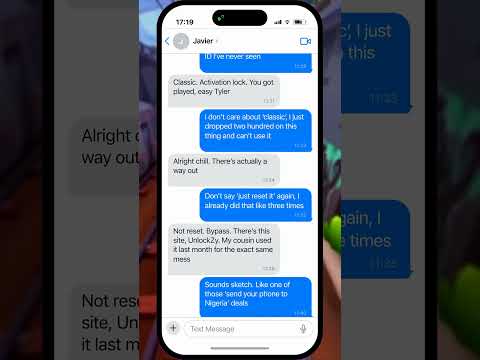
This short shows a realistic chat between Javier and his friend who got burned in a sketchy phone trade. It walks through using a legitimate online bypass service—no shipping your phone or dealing with shady resellers. Just enter your IMEI and serial number, and the lock gets removed remotely.
Unlike carrier unlocking or Android’s factory reset protection, iCloud Activation Lock is unique to Apple devices and requires specific steps to resolve. People often search for help using phrases like “how to bypass activation lock,” “locked iPhone after reset,” or “remove Apple ID from used iPhone.”
Perfect if you bought a used iPhone that won’t complete setup.
If this kept you from throwing away a $200 brick, hit like and follow for more honest, no-fluff tech advice.
#iCloudActivationLock #iPhoneActivationLock #UnlockZy #iPhoneTips #Shorts