


An iCloud locked MacBook Pro is defined by Apple’s Activation Lock feature, which ties the device to a specific Apple ID and blocks all access until that account’s credentials are entered. Buying a secondhand MacBook Pro with this lock active is one of the most common and frustrating problems in the used Apple market. The good news is that two legitimate paths exist: getting the previous owner to remove the device from their account, or submitting a formal request to Apple with proof of purchase. This guide covers both methods, explains why software bypasses fail, and shows you how to avoid this problem entirely before your next purchase.
What does “iCloud locked MacBook Pro” actually mean?
Activation Lock is Apple’s built-in theft deterrent. When a Mac has Find My Mac enabled, the device binds to the owner’s Apple ID. A factory reset alone does not remove this lock. That fact surprises most buyers, who assume wiping the drive clears everything.
When you power on a locked Mac, you see a screen asking for the previous owner’s Apple ID and password. You cannot proceed past that screen without those credentials. The Mac is fully functional hardware, but completely inaccessible to you as the new owner.
Checking your device’s lock status takes less than two minutes:
- Power on the MacBook Pro and observe whether it shows an Activation Lock screen requesting an Apple ID.
- Visit checkcoverage.apple.com and enter the serial number (found on the bottom case or in the original box).
- Look for any indication that Find My is active on the device.
- If you already have access to macOS, go to System Settings, click your Apple ID, and check whether Find My Mac is toggled on.
Signs that confirm the lock is active include:
- A gray lock icon on the startup screen with an Apple ID email field
- A prompt for a password before macOS loads
- Inability to complete macOS Setup Assistant without Apple ID credentials
- Error messages during an Erase All Content and Settings attempt
Pro Tip: Before concluding the device is locked, rule out a firmware password. A firmware password produces a lock icon with a padlock graphic, not an Apple ID field. The two look similar but require different solutions.
How to unlock a MacBook Pro when the previous owner is reachable
The fastest solution to remove an iCloud lock on a MacBook Pro is previous owner removal through iCloud.com. This process takes approximately 30 seconds and requires nothing more than a browser and the seller’s Apple ID credentials.
Here is the exact process the previous owner needs to follow:
- Open a browser and go to icloud.com/find.
- Sign in with their Apple ID and password.
- Click “All Devices” at the top of the screen.
- Select the MacBook Pro from the device list.
- Click “Remove from Account.”
- Confirm the removal when prompted.
That single action instantly disables Activation Lock on the device. You can then power on the Mac and complete setup as normal. No software tools, no Apple Store visit, and no documentation required.
Coordinating this with a seller requires a bit of planning. Contact the seller before or immediately after purchase and ask them to complete this step while you are present, either in person or on a video call. Watching them do it in real time eliminates any doubt. If the seller is remote, ask them to share a screenshot confirming the device no longer appears in their iCloud device list.

Pro Tip: Ask the seller to sign out of iCloud directly on the MacBook Pro before you take possession. Go to System Settings, click the Apple ID name, scroll to the bottom, and click “Sign Out.” This removes the device from their account at the source, not just remotely.
If the seller claims they cannot remember their Apple ID password, they can recover it through Apple’s account recovery portal at iforgot.apple.com. Recovery timelines vary depending on the account’s security settings, but this is still the fastest path compared to going through Apple Support yourself.
What to do when the previous owner is unavailable
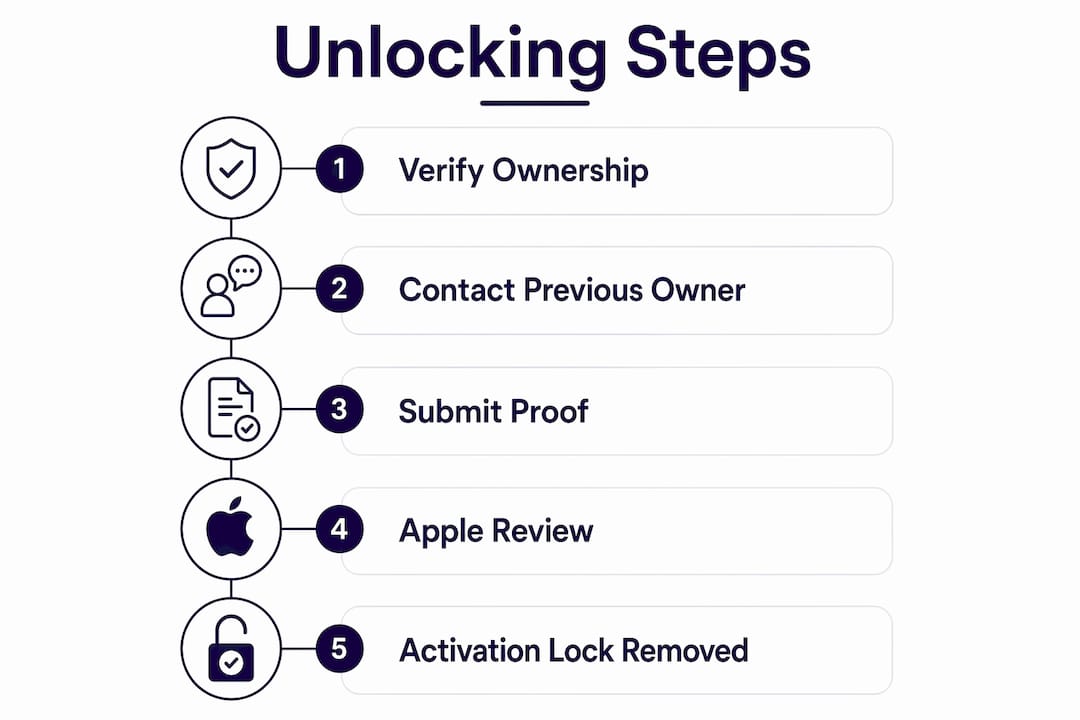
When the seller is unreachable, the only permanent official option is Apple’s Activation Lock removal support process. Apple’s support request requires you to submit specific documentation proving you are the legitimate owner of the device.
Required documents and information include:
- The device’s serial number (printed on the bottom case or in the original packaging)
- Original proof of purchase such as a receipt, invoice, or order confirmation showing your name and the device’s serial number
- A government-issued ID matching the name on the purchase receipt
- A written description of how you came to own the device
Apple reviews these submissions and, if the documentation is satisfactory, removes the Activation Lock from their server side. The device then clears the lock screen on next startup. Apple does not publicly list exact processing timelines, but requests with complete documentation typically move faster than incomplete ones.
Service centers that specialize in Apple hardware, such as MacTech Pro, can help you prepare and organize this documentation package before submission. This is worth considering if your purchase receipt is in a foreign language, is a handwritten note from a private seller, or lacks a serial number reference.
Pro Tip: Always request an itemized receipt from any private seller that includes the MacBook Pro’s serial number. A generic “sold as seen” note will not satisfy Apple’s documentation requirements.
“The only official permanent method to remove Activation Lock without previous owner credentials requires Apple’s support request with valid proof of purchase, including the device serial number and original purchase documentation.”
This process has real limitations. Apple can decline requests if documentation is insufficient or if the device appears on a stolen device registry. If Apple declines your request, your options narrow considerably, which is exactly why verifying lock status before purchase matters so much.
Why software bypass tools for MacBook Pro iCloud lock are unreliable
Software bypass tools do not permanently remove Activation Lock. Bypasses are temporary by design because the lock lives on Apple’s servers, not on the device itself. A macOS update or a clean reinstallation reactivates the lock immediately.
The risks go beyond inconvenience:
- Re-lock after updates: Any macOS update can trigger the lock to re-engage, leaving you back at square one.
- Security exposure: Many bypass tools require disabling System Integrity Protection or installing unsigned kernel extensions, which opens the Mac to malware.
- Legal risk: Third-party bypass services are frequently linked to the resale of stolen devices. Using one could make you an unwitting participant in that chain.
- No warranty or support: A Mac running a bypass patch cannot receive Apple service or AppleCare support.
- Instability: Patched systems often exhibit random crashes, failed updates, and broken system features.
The T2 security chip, present in Intel MacBook Pro models from 2018 onward, and the Apple Silicon chip in M-series Macs make software bypasses even harder to sustain. These chips enforce Activation Lock at the hardware level, not just in software. You can read more about T2 chip bypass limitations and why they rarely hold up over time.
The bottom line is straightforward. A bypass tool gives you a temporarily usable Mac that can lock again at any moment. An official unlock gives you a fully functional Mac with no restrictions.
Steps to take before buying a secondhand MacBook Pro
Prevention is far more reliable than any unlock process. Most sellers who leave Activation Lock active on a sold device simply did not know they needed to remove it. A short checklist before you hand over money saves significant time.
| Check | What to verify |
|---|---|
| Serial number lookup | Confirm the serial number at checkcoverage.apple.com before purchase |
| Find My Mac status | Ask seller to show System Settings confirming Find My is off |
| iCloud sign-out | Watch seller sign out of iCloud on the device in front of you |
| Account removal | Confirm device no longer appears in seller’s iCloud device list |
| Activation Lock screen | Power cycle the Mac after sign-out to confirm no lock screen appears |
Before finalizing any secondhand purchase, run through this checklist:
- Ask the seller to power on the Mac and navigate to System Settings to show their Apple ID is signed in.
- Request that they sign out of iCloud and disable Find My Mac while you watch.
- After sign-out, restart the Mac and confirm it boots directly to the Setup Assistant without an Activation Lock screen.
- Get a receipt with the serial number included.
Proper seller practices require disabling Find My Mac and signing out of iCloud before any device transfer. A seller who refuses to do this in front of you is a serious red flag. Walk away from any deal where the seller insists you can “sort it out later.”
Key Takeaways
An iCloud locked MacBook Pro can only be permanently unlocked through the previous owner’s account removal or Apple’s official support process with valid proof of purchase.
| Point | Details |
|---|---|
| Activation Lock is server-side | Factory reset alone does not remove the lock; Apple’s servers control it. |
| Previous owner removal is fastest | The seller can remove the device from iCloud.com in about 30 seconds. |
| Apple support requires documentation | Submit serial number and original purchase receipt for official removal. |
| Software bypasses are temporary | Updates and reinstalls reactivate the lock, making bypasses unreliable. |
| Verify before you buy | Watch the seller sign out of iCloud and confirm no lock screen on restart. |
What I’ve learned from watching buyers skip the basics
Mantas here. After years of watching people navigate the secondhand Apple market, the pattern is always the same. Buyers focus on the price and the condition of the screen. They forget to ask the one question that determines whether the Mac is actually usable: “Is Find My Mac still on?”
I’ve seen buyers pay full market price for a MacBook Pro, take it home, and discover it won’t get past the Activation Lock screen. At that point, they have two options. They can chase down the seller, who may or may not respond. Or they can go through Apple’s support process, which requires documentation they didn’t think to collect at the time of sale.
The uncomfortable truth about the secondhand Mac market is that a locked device is not always the seller’s fault. Many people genuinely don’t know that signing out of iCloud and disabling Find My are separate steps from wiping the drive. They hand over what they think is a clean Mac, and the buyer gets a locked one. That’s why the buyer has to be the one who asks the right questions.
My advice is simple. Never complete a secondhand Mac purchase without watching the seller sign out of iCloud on the device. If the transaction is remote, require a video call. If the seller won’t do it, the deal isn’t worth the risk. The 30 seconds it takes to verify this is the most valuable 30 seconds in any used Mac transaction.
— Mantas
How Bybassicloud can help with your iCloud lock situation
Dealing with an iCloud locked Mac is stressful, especially when the seller has gone quiet and Apple’s support process feels unclear.
Bybassicloud provides guides, tools, and step-by-step resources for Apple device iCloud lock situations across iPhones, iPads, and Macs. If you need help understanding the Apple Activation Lock removal process or want guidance on removing an iCloud lock from other Apple devices you own, Bybassicloud covers the full range of official and documented methods. The site also walks through credential recovery steps for buyers who need to work with a previous owner’s account situation. Visit Bybassicloud to find the guide that matches your specific device and situation.
FAQ
What is Activation Lock on a MacBook Pro?
Activation Lock is Apple’s security feature that ties a Mac to an Apple ID when Find My Mac is enabled. It prevents anyone without the account credentials from using or resetting the device.
Can I remove iCloud lock on a MacBook Pro without the previous owner?
Yes, but only through Apple’s official support process. You must submit the device’s serial number and valid proof of purchase for Apple to review and remove the lock.
How long does Apple’s Activation Lock removal take?
Apple does not publicly list a fixed timeline. Submissions with complete documentation, including a serial number-matched receipt, typically process faster than incomplete ones.
Does a factory reset remove the iCloud lock on a MacBook Pro?
No. Factory reset does not remove Activation Lock because the lock is stored on Apple’s servers, not on the device itself.
Are software bypass tools safe for MacBook Pro iCloud lock?
Software bypasses are not safe or permanent. They are temporary workarounds that re-engage after updates and carry security and legal risks that outweigh any short-term benefit.
Recommended
- How to remove iCloud Activation lock on MacBook Air M1 A2337 using Unlocks Hub USB Configurator – Bypass iCloud – iCloud Activation Lock Removal Solutions & Guides
- How To Bypass T2 Macbook iCloud Activation Lock By Using Windows FRPFILE Tool | iBridgeOS 4 to 10.5 – Bypass iCloud – iCloud Activation Lock Removal Solutions & Guides
- Stuck on Hello? How to Remove iCloud Activation Lock — Ski Rental Sale
- iCloud Lock Remove iPhone Without PC FREE | 2026 Update – Bypass iCloud – iCloud Activation Lock Removal Solutions & Guides
