

Apple Business Manager lock is defined as an organization-linked Activation Lock that prevents unauthorized reactivation of company-owned Apple devices, even after a factory reset. IT professionals managing corporate iPhone, iPad, and Mac fleets encounter this feature constantly, yet its mechanics are widely misunderstood. The confusion typically centers on one critical point: what is apple business manager lock, and how does it differ from a standard iCloud Activation Lock? The short answer is that ABM lock ties a device to an organization’s Mobile Device Management system, not to a personal Apple ID. Understanding that distinction shapes every decision you make about enterprise device security.
How does Apple Business Manager lock work with MDM?
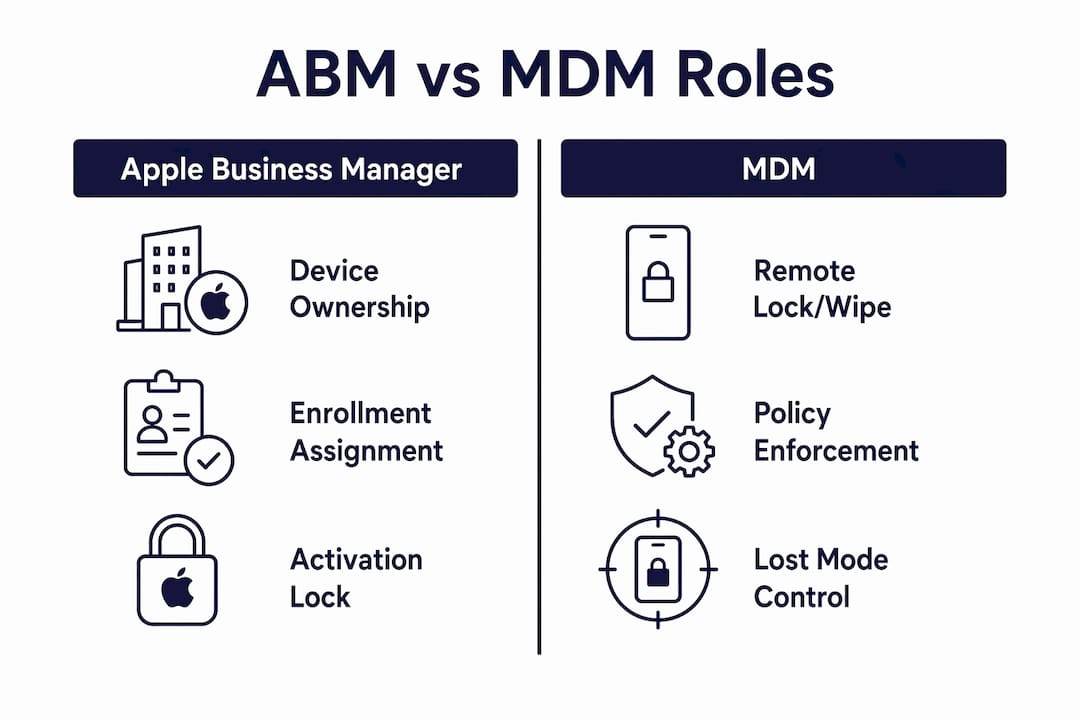
Organization-linked Activation Lock is the formal Apple term for what most IT teams call the ABM lock. Apple Business Manager itself functions as the enrollment orchestrator. It records device ownership, assigns devices to MDM servers, and acts as the authoritative source of truth for which organization controls a given device. MDM is the enforcement engine. It sends remote commands, applies configuration profiles, and executes security policies.
ABM alone cannot remotely lock, wipe, or place a device in Lost Mode. Those commands must be pushed via MDM. Think of ABM as the title deed to a property and MDM as the security system installed inside it. Owning the deed does not automatically arm the alarm.

Automated Device Enrollment and zero-touch deployment
Automated Device Enrollment (ADE) is the mechanism that links a device to ABM at the point of purchase. When a device ships directly from Apple or an authorized reseller, it arrives pre-assigned to the organization’s ABM account. The moment an employee powers it on, the device contacts Apple’s servers, confirms its ABM assignment, and automatically enrolls into the designated MDM. No IT technician needs to touch it. This is zero-touch deployment, and it is where the organization-linked lock becomes most powerful.
Devices reset while still enrolled in ABM automatically re-enroll into MDM and maintain the organization-linked Activation Lock until an administrator releases them. That persistence is the core security advantage. A thief who wipes a stolen corporate iPhone cannot reactivate it without the organization’s MDM credentials.
ABM vs. MDM roles at a glance
| Function | Apple Business Manager | MDM |
|---|---|---|
| Device ownership record | Yes | No |
| Enrollment assignment | Yes | No |
| Remote lock command | No | Yes |
| Remote wipe command | No | Yes |
| Lost Mode activation | No | Yes |
| Policy enforcement | No | Yes |
| Activation Lock removal | Yes (admin interface) | Assisted |
Pro Tip: Always confirm that your MDM server is correctly assigned in ABM before devices ship. A device that arrives without an MDM assignment skips automatic enrollment and loses the persistent lock protection entirely.
What are the security benefits and limitations of ABM lock?
The security benefits of the ABM lock are concrete and significant. A device enrolled through ADE stays under organizational control regardless of what happens to it physically. Lost Mode, available through MDM, lets an IT admin remotely lock the screen, display a custom message with a contact number, and track the device’s location. If recovery is impossible, a remote wipe erases all data and the device re-enrolls on first boot, still locked to the organization.
The limitations are equally concrete and worth knowing before you rely on this system.
- Enrollment timing is critical. Devices not added to ABM at purchase lose the persistent lock protection. Manual enrollment after the fact is possible but does not carry the same zero-touch security guarantee.
- Releasing a device is permanent. Releasing a device from ABM removes all management and lock controls. Once released, the organization cannot remotely manage or unlock it.
- Personal Apple ID conflicts cause real problems. If an employee signs into a personal Apple ID on a supervised device, that ID can layer on top of the organizational lock. Proper MDM configuration prevents personal Apple ID sign-in on supervised devices, but only if the policy is applied before the user touches the device.
- Unreleased devices can become permanently unusable. A device that is released from ABM without first disabling Activation Lock may remain locked to the previous user’s Apple ID. The organization loses all ability to recover it.
Pro Tip: Capture every device serial number in ABM during procurement, before the device leaves the warehouse. This single step preserves your ability to manage, track, and recover the device for its entire lifecycle.
How to manage and unlock devices with Apple Business Manager lock?
Turning off Activation Lock within ABM requires appropriate administrator permissions and only works when the device is still enrolled and not yet released. The process is straightforward for a prepared IT team.
- Sign in to Apple Business Manager with an administrator or device enrollment manager account.
- Search for the device by serial number or name in the Devices section.
- Select the device and choose “Edit” to view its Activation Lock status.
- Click “Disable Activation Lock” to clear the lock from Apple’s servers.
- If the device is in Lost Mode, send an MDM command to remove Lost Mode before attempting setup.
- The device can now be set up without requiring the previous user’s Apple ID credentials.
Disabling Activation Lock in ABM does not require the employee’s Apple ID password. This is the critical advantage over a personal iCloud lock, where Apple requires the original account credentials. For IT teams handling employee departures, this means a returned device can be wiped and redeployed without chasing down former employees for their passwords.
Device release and its consequences
Releasing a device from ABM is a separate action from disabling Activation Lock, and the two are often confused. Releasing removes the device from the organization’s inventory and strips MDM supervision. The device becomes unmanaged. If Activation Lock was not disabled before release, the device may remain locked to the last signed-in Apple ID. That situation requires either the original Apple ID credentials or professional unlocking assistance.
Common scenarios where this matters include device resale, employee departure, and device refurbishment. The recommended practice is always to disable Activation Lock first, then wipe the device through MDM, and only then release it from ABM. Skipping any step in that sequence creates a device that is either locked or unmanaged, and sometimes both.
For devices where the MDM lock creates complications after an improper release, professional tools and guides exist to help recover access.
What is the relationship between ABM lock and the broader Apple Business platform?
As of June 2026, Apple has integrated ABM into the broader Apple Business platform. The core functionality of the organization-linked Activation Lock remains unchanged. The integration adds new capabilities around automation and inventory management.
Key changes and features in the 2026 Apple Business platform include:
- REST API for automation. The 2025 REST API enables automated device inventory management and enrollment workflows, but MDM integration remains required for security enforcement.
- Unified management interface. ABM’s device management tools now sit alongside broader business account management, reducing the number of separate portals IT teams must navigate.
- Scalable zero-touch deployment. The integrated platform supports zero-touch deployment at scale, meaning organizations deploying hundreds of devices simultaneously can do so without manual configuration at each device.
- Persistent lock across the platform. The organization-linked Activation Lock remains foundational. No platform update changes the core rule: ABM records ownership, MDM enforces it.
For businesses adopting the full Apple Business platform in 2026, the ABM lock is not a legacy feature to work around. It is the security foundation that makes large-scale Apple device management viable. Organizations that skip proper ABM setup at procurement undermine every other security measure they put in place.
Key Takeaways
Apple Business Manager lock is an organization-linked Activation Lock that requires MDM integration to enforce remote security commands, and its protection is only as strong as the enrollment process that precedes it.
| Point | Details |
|---|---|
| ABM is not MDM | ABM records device ownership; MDM enforces locks, wipes, and policies. |
| Persistent lock after reset | ABM-enrolled devices re-enroll into MDM automatically after a factory reset. |
| Enrollment timing matters | Devices not added to ABM at purchase lose persistent lock protection permanently. |
| Release is irreversible | Releasing a device from ABM removes all management and lock controls permanently. |
| Disable lock before release | Always disable Activation Lock in ABM before wiping and releasing any device. |
The part most IT guides get wrong about ABM lock
After working through dozens of enterprise Apple deployments, the single most damaging misconception I encounter is treating ABM as a standalone security tool. Organizations set up ABM, enroll their devices, and assume the lock is protecting them. It is not, unless MDM is properly configured and assigned.
ABM is the source of truth for ownership. MDM is the arm that acts on that truth. Without MDM, ABM is a very well-organized inventory spreadsheet. The lock exists in Apple’s servers, but no one can trigger it remotely without MDM sending the command.
The second mistake I see regularly is releasing devices without disabling Activation Lock first. I have seen IT teams hand refurbished iPhones to new employees, only to discover the devices are locked to a former employee’s Apple ID. The former employee is unreachable. The device is a paperweight. That outcome is entirely preventable with one extra step in the offboarding checklist.
Zero-touch deployment, when set up correctly, is genuinely impressive. A device ships directly to a remote employee, they power it on, and within minutes it is supervised, locked to the organization, and fully configured. That experience is only possible because ABM and MDM are working together from the first boot. Neither tool achieves it alone.
My recommendation to any IT team managing Apple devices: treat ABM enrollment at procurement as a non-negotiable requirement, not an optional best practice. Every device that skips that step is a liability you will eventually have to resolve manually.
— Mantas
Professional help for Activation Lock issues on Apple devices
Activation Lock problems do not always follow a clean corporate offboarding process. Secondhand devices, improperly released corporate hardware, and devices with forgotten Apple IDs all create situations where standard ABM procedures no longer apply.
Bybassicloud provides step-by-step guides and tools for resolving iCloud and Activation Lock issues across a wide range of Apple devices and iOS versions. Whether you are dealing with a device stuck on the Hello screen after an improper corporate release or a secondhand iPhone locked to a previous owner, the guides cover current methods compatible with iOS 26.5 and earlier. For devices running the latest firmware, the iOS 26.5 Activation Lock removal guide walks through the process with clear, tested instructions.
FAQ
What is Apple Business Manager lock exactly?
Apple Business Manager lock is an organization-linked Activation Lock that ties a company-owned Apple device to the organization’s MDM system. It prevents unauthorized reactivation even after a factory reset.
Can ABM lock a device without MDM?
ABM cannot send remote lock or wipe commands on its own. MDM is required to execute those commands; ABM only records device ownership and enrollment assignment.
How do you turn off Activation Lock in Apple Business Manager?
An administrator signs into ABM, locates the device by serial number, and selects “Disable Activation Lock.” The device can then be set up without the previous user’s Apple ID credentials.
What happens when you release a device from ABM?
Releasing a device from ABM permanently removes management and lock controls. If Activation Lock was not disabled first, the device may remain locked to the previous user’s Apple ID.
Does a factory reset remove the ABM lock?
A factory reset does not remove the ABM lock. Devices enrolled through ABM automatically re-enroll into MDM after a reset and remain under the organization-linked Activation Lock until an administrator releases them.
Recommended
- How to Remove MDM Lock from iPhone/iPad Without Password (2026 Updated) – Bypass iCloud – iCloud Activation Lock Removal Solutions & Guides
- Bought a Used iPhone? Unlock Apple ID/MDM/Screen Lock/iCloud Easily! – Bypass iCloud – iCloud Activation Lock Removal Solutions & Guides
- iPhone Locked to Owner? Apple ID Removal Without Computer | New Method 2026
- iPhone Locked to Owner? Fast Checks & Reality of iCloud Activation Lock – Bypass iCloud – iCloud Activation Lock Removal Solutions & Guides