

Permanent iCloud Unlock on iPad | Activation Bypass iPhone iPad | Unlocks Hub
⚠️ IMPORTANT DISCLAIMER – READ THIS FIRST
Before we dive in, let’s be completely transparent with you.
The term “permanent” in the context of iCloud bypass is often misunderstood. Here’s what it really means:
| Type | What It Means | Reality |
|---|---|---|
| True Permanent | Device is removed from Apple’s Activation Lock servers | ✅ Only Apple or the original owner can do this |
| Setup-Level Bypass | Device is tricked into skipping the lock screen during setup | ⚠️ May survive restarts but can break with updates |
| Custom IPSW Method | Modified firmware is installed to bypass activation | ⚠️ Complex, risky, and success varies by device |
Unlocks Hub is a service that provides custom IPSW files and iCloud unlock solutions. However, it’s important to understand what this service can and cannot do before proceeding.
🔍 What Is Unlocks Hub?
Unlocks Hub is a third-party service that offers iCloud activation lock removal for iPhones, iPads, and iPods. According to available information:
-
Service Type: Provides custom IPSW downloads and iCloud unlock solutions
-
Contact: Email-only support (adrianmarinabay@gmail.com)
-
Cost: Not a free service
-
Method: Uses custom IPSW firmware to bypass activation locks
⚠️ Important Warning: The service explicitly warns about fraudsters using fake profiles. They state: “Be careful of fraudsters luring you with fake profile using our name. Do not contact anyone other than this email address.”
📱 What Devices Does Unlocks Hub Support?
According to the service information, Unlocks Hub supports a wide range of Apple devices:
| Device Category | Supported Models |
|---|---|
| iPhone | 4, 4S, 5, 5C, 5S, 6, 6+, 6S, 6S+, 7, 7+, 8, 8+, X, XS, XS Max, XR, 11, 11 Pro, 11 Pro Max, 12, 13, 13 Mini, 13 Pro, 13 Pro Max, 14, 14 Plus, 14 Pro, 14 Pro Max, SE (all generations) |
| iPad | All models (specific models not listed but mentioned as supported) |
| iPod | Supported |
iOS Versions Supported:
-
iOS 7 through iOS 17.4
-
iOS 16.x versions (16.1, 16.2, 16.3, 16.4, 16.5, 16.6)
-
iOS 17.x versions (17.0.1, 17.0.2, 17.0.3, 17.1, 17.1.1, 17.2.1, 17.3, 17.3.1, 17.4)
🛠️ How Does Unlocks Hub Work?
Unlocks Hub primarily uses the Custom IPSW method.
What Is a Custom IPSW?
IPSW (iPhone/iPod Software) is the firmware file that Apple uses to restore iOS devices. A custom IPSW is a modified version of this firmware that has been altered to bypass the iCloud activation lock.
The Process:
| Step | Action |
|---|---|
| 1 | You contact Unlocks Hub via email |
| 2 | You provide your device model and iOS version |
| 3 | Unlocks Hub provides a custom IPSW file |
| 4 | You install the custom IPSW using iTunes or Finder |
| 5 | The device bypasses the activation lock |
⚠️ Important: Custom IPSW creation is described as “very complicated” and “delicate” – the “slightest mistake can cause iPhone bricking”.
🔍 What Does “Permanent” Actually Mean?
The term “permanent” in the context of Unlocks Hub requires careful examination.
What “Permanent” Typically Means for Custom IPSW
| Aspect | Reality |
|---|---|
| Survives Restarts | ✅ Usually yes – the bypass is applied at the firmware level |
| Survives iOS Updates | ❌ Usually no – updating iOS can remove the bypass |
| Survives Factory Resets | ⚠️ Depends on the method – some bypasses survive, others don’t |
| Cellular Signal | ⚠️ May be affected – some methods are WiFi-only |
| Apple ID Removal | ❌ No – the device is still associated with the original Apple ID on Apple’s servers |
The Hard Truth
A custom IPSW bypass does NOT remove the device from Apple’s Activation Lock servers. It only modifies the local firmware to skip the activation check. The device remains associated with the original Apple ID in Apple’s database.
This means:
-
The bypass can break after an iOS update
-
The bypass may break after a restore
-
The device may re-lock if certain conditions are met
📊 Unlocks Hub vs. Other Methods
| Method | Cost | Permanence | Risk Level | Works on New Devices? |
|---|---|---|---|---|
| Unlocks Hub (Custom IPSW) | Paid | ⚠️ May break with updates | 🔴 High (brick risk) | ⚠️ Limited |
| tr4mpass (Open-Source) | Free | ⚠️ Varies | 🟡 Moderate | ✅ Up to iOS 26.1 |
| Official Apple Methods | Free | ✅ Permanent | 🟢 Safe | ✅ All devices |
| Dr.Fone / AnyUnlock | Paid | ⚠️ Varies | 🟢 Safe | ✅ Modern devices |
🚨 Important Warnings and Red Flags
1. Custom IPSW Is Risky
Creating and installing custom IPSW is a delicate process:
-
The “slightest mistake can cause iPhone bricking”
-
It primarily works on older iPhones
-
Requires technical knowledge
2. Beware of Scams
Unlocks Hub itself warns about fraudsters:
-
Only contact the official email address
-
Report any suspicious accounts or scam pages
-
Be careful of fake profiles using their name
3. No Guarantees
Third-party unlock services often have inconsistent results:
-
Many users report scams and hidden fees
-
Success is not guaranteed
-
You may lose your money with no results
4. Legal Considerations
-
✅ You can legally unlock a device you own
-
⚠️ Unlocking someone else’s device without permission is illegal
-
Some services may be operating in a legal gray area
✅ Safer Alternatives to Consider
Option 1 – Official Apple Methods (Free & Permanent)
| Method | How It Works |
|---|---|
| Previous Owner | Ask them to remove the device from iCloud.com |
| Apple Support | Provide proof of purchase for official removal |
| iCloud.com | Remove the device yourself if you have Apple ID access |
These are the only guaranteed permanent solutions.
Option 2 – Open-Source Tools (Free)
| Tool | Platform | Compatibility |
|---|---|---|
| tr4mpass | macOS/Linux/WSL | iOS 12 – 26.1, A5–A17 chips |
| LIBRE-HACKTIVATOR | macOS/Linux | iOS 12 – 16, checkm8-compatible devices |
These tools run locally on your computer – no servers, no payments, no accounts needed.
Option 3 – Reputable Paid Tools
| Tool | Platform | Features |
|---|---|---|
| Dr.Fone – Screen Unlock | Win/Mac | Bypass iCloud lock, screen passcode, Apple ID |
| AnyUnlock | Win/Mac | Remove iCloud activation lock without password |
📋 What You Should Do
If You’re Considering Unlocks Hub:
| Step | Action |
|---|---|
| 1 | Verify the device is yours – you must own it legally |
| 2 | Contact only the official email – avoid fraudsters |
| 3 | Understand the risks – custom IPSW can brick your device |
| 4 | Ask about success rates – get clarity on what “permanent” means |
| 5 | Back up your data – before attempting any bypass |
If You Want a Safer Approach:
| Step | Action |
|---|---|
| 1 | Try official methods first – previous owner or Apple Support |
| 2 | Consider open-source tools – tr4mpass is free and well-documented |
| 3 | Use reputable paid tools – Dr.Fone and AnyUnlock have established track records |
| 4 | Avoid services that seem too good to be true – they usually are |
🔚 Final Verdict
Is Unlocks Hub a permanent iCloud unlock solution for iPad and iPhone?
The honest answer: It depends on your definition of “permanent.”
| Aspect | Verdict |
|---|---|
| Does it work? | ⚠️ Possibly – for some devices and iOS versions |
| Is it permanent? | ⚠️ Not in the true sense – the device remains linked to Apple’s servers |
| Is it safe? | ⚠️ Risky – custom IPSW can brick devices |
| Is it free? | ❌ No – it’s a paid service |
| Is it legal? | ✅ Yes – if you own the device |
What you should know:
-
✅ Unlocks Hub provides custom IPSW solutions for iCloud bypass
-
⚠️ Custom IPSW methods are complex and risky
-
⚠️ “Permanent” bypasses can break with iOS updates or restores
-
🚨 Beware of scammers – only use the official contact method
-
✅ Official Apple methods are the only guaranteed permanent solution
If you’re the rightful owner – contact Apple. They will help you for free.
If you’re considering third-party services – proceed with extreme caution. Understand the risks, verify the service, and never share your Apple ID password.
💬 FAQ – Unlocks Hub iCloud Unlock
Q: Is Unlocks Hub a legitimate service?
A: Unlocks Hub is a service that provides custom IPSW solutions. However, like many third-party unlock services, results can be inconsistent. Always verify through official channels.
Q: Does Unlocks Hub offer a permanent iCloud unlock?
A: Custom IPSW bypasses are not truly permanent – the device remains associated with the original Apple ID on Apple’s servers. Updates or restores may break the bypass.
Q: Is Unlocks Hub free?
A: No – it’s a paid service.
Q: What devices does Unlocks Hub support?
A: iPhone 4 through iPhone 14, all iPad models, and iPods.
Q: What iOS versions does Unlocks Hub support?
A: iOS 7 through iOS 17.4.
Q: Is using Unlocks Hub safe?
A: Custom IPSW methods carry risks, including the potential to brick your device. Only proceed if you understand the risks.
Q: Is it legal to use Unlocks Hub?
A: Yes – if you are the rightful owner of the device. Unlocking someone else’s device without permission is illegal.
Q: What’s a safer alternative to Unlocks Hub?
A: Official Apple methods (previous owner removal, Apple Support with proof of purchase) are free, safe, and truly permanent. Open-source tools like tr4mpass are also available for free.
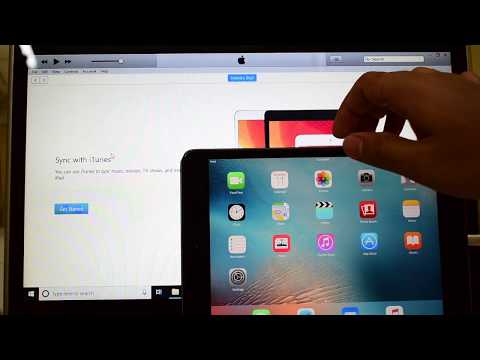
This video is of iCloud Activation lock removal on apple ipad mini. Works on iPhone X, iPhone XS, iPhone XS Max, iPhone XR, iPhone 7, iPhone 7+, iPhone 6, iPhone 6+, iPhone 6S, iPhone 6S+, iPhone 5S, iPhone 5, iPhone 5C, iPhone 8, iPhone 8 Plus, iPhone 10, iPhone 10 Max, iPhone 10 R, iPhone 4S and iPhone 4 iPhone 11 iPhone 11 Pro 11 pro max. Helps remove activation lock from apple iPhones. You can remove iCloud lock from iPads, iPhone , iPod. Comes with network fix and camera fix. Works on iOS 11, iOS 10, iOS 9, iOS 8 and iOS 7 as well. and iOS 11.1.4. Works on iOS 13.3 ios 12.1.1, 12.1.4. New latest cfw icloud unlock method 2018.exe, 2019.exe in 2020. Using custom ipsw #icloudunlock #activationlock #apple in iOS 12.1 #ios12.2 and iOS 12.3 iOS 12.4.3 4K Video may 2019 December 2019 2018.exe 2019.exe April 2020 March iOS13.3.1 iOS 12.4.5 iOS 13.4.1 13.4 12.4.6 exe
Other important videos –
Permanent iCloud bypass on iPad – https://youtu.be/F7OiKarjYAs
iPhone X iCloud bypass – https://youtu.be/gH4Q-Y1XZss
iOS 12.4.4 Permanent iCloud unlock – https://youtu.be/CesVnDLU7ww
iOS 13.3 Permanent iCloud unlock – https://youtu.be/b8ZkkYZzxAM
How to install Checkra1n – https://youtu.be/cGncSaDONR4
iPhone Checkra1n iCloud bypass – https://youtu.be/VP6T9wcu0xw
Checkra1n ERROR FIX – https://youtu.be/w3XLQ1oOQqc

Sir thank you so much this video is so verry helpful mwahhh meaaah mwaaaaaaaahhhhhhhh god bless u
where i can download that ipad mini custom firmware